
Enabling the built-in AI
Since version 3.0, Paperless-ngx ships its own AI: it suggests titles, correspondents, document types and tags, and answers questions about individual documents in a chat (“What is the notice period in this contract?”). It is off by default — Paperless-ngx does not come with a language model, so one has to be connected.
Not to be confused with "paperless-ai"This page is about the AI built into Paperless-ngx itself. There is also a third-party project of the same name, paperless-ai — a separate tool that we do not offer at server.camp. What we do provide on top is paperless-gpt.
To use it, you have two options at server.camp:
- Your own language model — you configure your provider directly in Paperless-ngx. At no extra cost, on every plan.
- The “AI features” add-on — we provide the language model and set up the connection for you. The add-on also includes paperless-gpt, which lets you automate tagging end to end.
| Your own language model | “AI features” add-on | |
|---|---|---|
| Price | no extra cost | paid, see the customer portal for your plan’s price |
| Suggestions for title, correspondent, document type, tags | ✓ | ✓ |
| Document chat and nightly index | ✓, if you configure an embedding model | ✓ |
| paperless-gpt: own interface, tag-driven automation, AI OCR | – | ✓ |
| Who configures it | you, in Paperless-ngx | we do; you only set the switch in the portal |
| Where document content goes | to your provider | Scaleway, Paris data centre |
| Text recognition via Azure AI (“remote OCR”) | – | – |
Prerequisite: Paperless-ngx 3.0Both options require Paperless-ngx 3.0 or newer. We are currently updating our customers’ instances to that version. If the AI settings are not in your instance yet, your update is still pending — contact support@server.camp and we will bring it forward. paperless-gpt from the add-on is independent of this and works with 2.x as well.
You need an account with a provider offering an OpenAI-compatible API (e.g. Scaleway, Mistral, OpenAI, Azure OpenAI) or an Ollama instance reachable over the internet. Cost and data protection are between you and that provider; we are not involved.
All configuration happens inside Paperless-ngx, not in the customer portal:
- Sign in as an administrator and open Administration → Configuration
- In the AI Settings tab, switch on the AI Enabled option
- Fill in the language model connection:
| Field | Value |
|---|---|
| LLM Backend | OpenAI-compatible or Ollama |
| LLM Model | your provider’s model name, e.g. gemma-3-27b-it |
| LLM API Key | your provider’s token |
| LLM Endpoint | base URL of the API; with OpenAI itself you can leave this empty |
- Optional, but required for the chat: LLM Embedding Backend (OpenAI-compatible, Ollama or Huggingface), LLM Embedding Model and — if it differs — LLM Embedding Endpoint
- Save
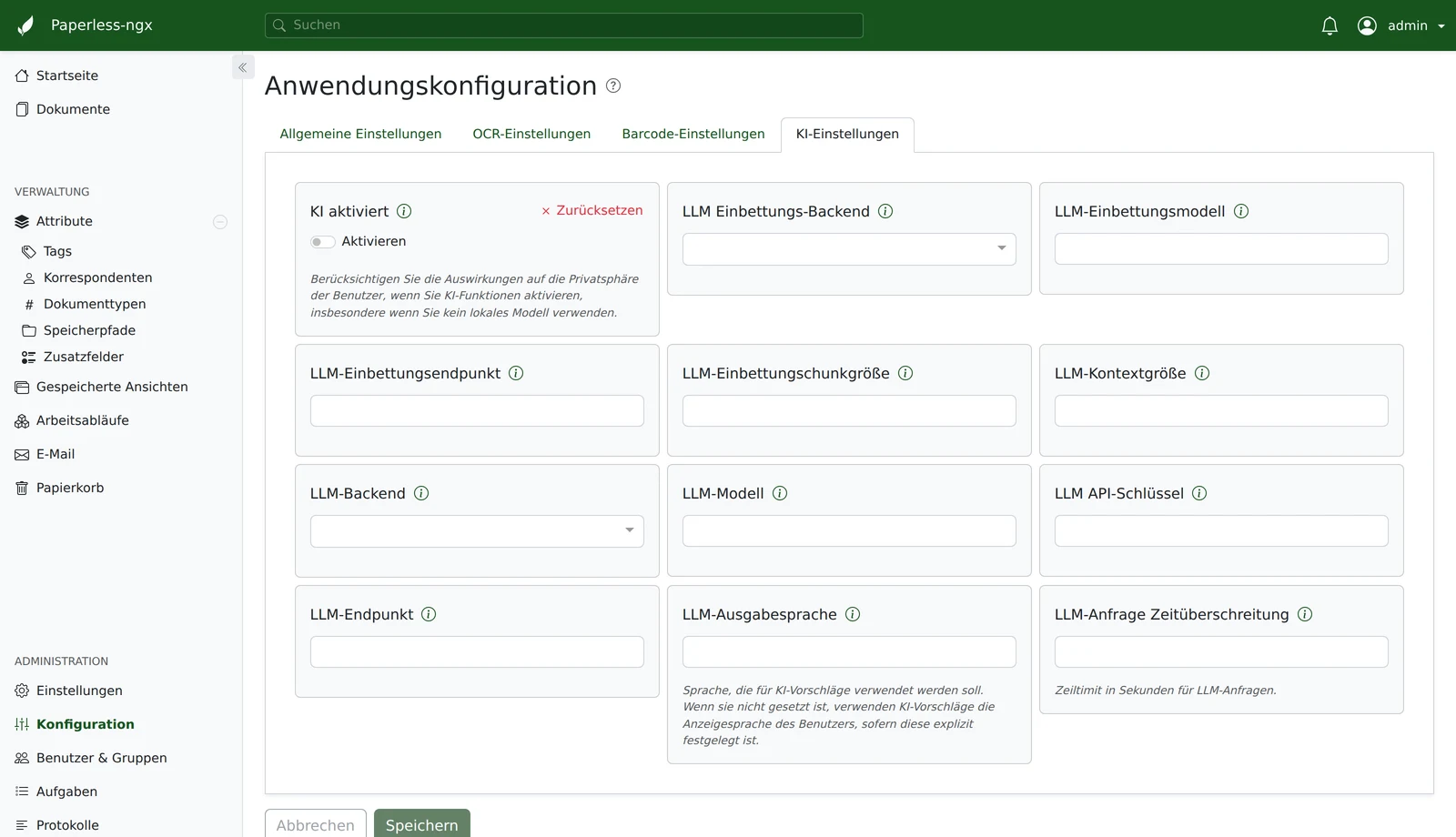
No embedding model, no chatSuggestions work without embeddings — they then only look at the document at hand. The document chat and the nightly index across your archive, however, require an embedding backend. Without one, the chat stays unavailable.
A model that handles several languages well is considerably more reliable on non-English documents than an English-only one. Plain chat models are enough here — multimodal capabilities only matter for paperless-gpt’s AI OCR.
In the customer portal, book the AI features add-on for your Paperless-ngx instance and tick Built-in AI with our language model in its settings (ticked by default). Provisioning takes one to two minutes — there is nothing to enter in Paperless-ngx.
What we configure for you:
| Setting | Value |
|---|---|
| Backend | OpenAI-compatible, endpoint at Scaleway (Paris) |
| Language model | Gemma 4 26b — multilingual, tuned for non-English documents |
| Embedding model | BGE Multilingual Gemma 2 — multilingual, tuned for non-English documents |
| Suggestion language | the document language set in the portal (default: German) |
Both models are fixed for the built-in AI and cannot be picked in the portal — the model selection there only applies to paperless-gpt.
That covers suggestions and the document chat. On top of that, the add-on includes paperless-gpt — with a preconfigured model as well — which tags documents fully automatically via tags and reads difficult scans using AI OCR.
The portal switch takes precedencePaperless-ngx combines its own “AI Enabled” toggle with our setting using a logical OR. As long as the option is set in the customer portal, the AI therefore cannot be switched off from within Paperless-ngx. To disable it, clear the checkbox in the customer portal — after that the in-app toggle works in both directions again.
The reverse also holds: if you enter your own values for backend, model, API key or endpoint in Paperless-ngx, those take precedence over ours. So even with the add-on booked you can switch to your own model at any time — clearing the fields falls back to our connection.
- AI suggestions for title, correspondent, document type and tags appear in the document view. They are only applied once you confirm them.
- The document chat becomes available.
- At around 2 a.m., Paperless-ngx builds an index across your archive (embeddings). It is what allows the chat and the suggestions to pull in contextually relevant documents. The first run processes your entire archive; after that only new or changed documents.
The nightly index covers the whole archiveUnlike suggestions, which you request explicitly, the index runs automatically across all documents. If only selected documents should be processed by AI, the chat is not the right tool — leave it off (no embedding model) and use the targeted, tag-driven suggestions of paperless-gpt instead.
Paperless-ngx 3.0 can additionally have scans read by Azure AI Document Intelligence (“remote OCR”). That feature is not currently available at server.camp: it can only be configured server-side, not in the interface, and we do not set it up — documents would be sent to a US provider. It is not part of the AI features add-on either.
If you need AI-assisted text recognition for hard-to-read scans, paperless-gpt’s AI OCR is the way to do it — it runs through the same model in Paris.
If you cancel the AI features add-on in the customer portal:
- Our connection disappears from your instance with the next deployment — the built-in AI is off, suggestions and chat are disabled.
- The nightly index is no longer rebuilt. Entries already created stay behind and become meaningless once there is no connection left.
- If you entered your own values for backend, model, API key and endpoint in Paperless-ngx, they are kept — the AI simply carries on using your own model (option 1).
- paperless-gpt is removed, but the prompts and settings you customised there stay stored. The trigger tags and the
paperless-gptservice account remain in Paperless-ngx; you can safely delete them.
None of this touches your documents, metadata or history — you are cancelling the AI, not your archive.
For suggestions, chat and the index, the text content of your documents is sent to the language model. Where to depends on the option you chose:
- Your own language model: to the provider you configured in Paperless-ngx. What happens to the content there is governed by your contract with them — check the location and the training opt-out in particular.
- “AI features” add-on: to Scaleway’s Generative APIs, hosted in Paris. Processing takes place inside the EU, the submitted content is not used to train the models, and no account with a US provider is involved.
Without the add-on we pass no AI configuration to your instance; as long as you do not configure one yourself and the switch is off, no document content leaves your instance.
The AI settings do not show up in Paperless-ngx at all. Your instance is most likely still on Paperless-ngx 2.x. Contact support@server.camp and we will schedule the update.
The switch is set but no suggestions appear. With your own language model, check the model name, API key and endpoint first — a typo in the model name only surfaces on the first call. The endpoint also has to be reachable over the internet.
The chat is missing or does not find the right documents. Without an embedding model there is no chat. If one is configured, the index is built overnight: right after enabling — or right after uploading new documents — it may still be incomplete.
Suggestions come back in the wrong language. With the add-on they follow the document language you set in the customer portal — check there first. If you use your own language model, Paperless-ngx follows the language of your user account; change it in your Paperless-ngx account settings.
If you get stuck, contact support@server.camp.